We write about lovely things like code, design, and, of course, how to use MarkupGo
Personalized Images in Email Campaigns: One Template URL, Zero Image-Service Bill
Dynamic image services charge per open because email marketers reliably pay for merge-tag personalization. The mechanism underneath is simpler than the pricing…
ZUGFeRD, XRechnung, KSeF, UBL: A Developer's Map of the 2026–2030 E-Invoicing Mandates
France's Factur-X mandate, effective September 2026, was the warm-up. By 2030, every EU business and most UK suppliers will face a rolling schedule of…
Your AI App Generates Markdown — Your Users Want a PDF: Turning LLM Output into Polished Reports
LLM-generated markdown differs from human-written markdown in five specific ways that break conventional converters. Chrome's own developer documentation warns…
Automatically Generate Branded PDF Invoices from Shopify Orders (Webhook + API, No App)
Shopify does not send branded PDF invoices automatically. Order Printer templates sit behind the admin panel, and invoice apps come with their own layout…
Dynamic OG Images in Astro, SvelteKit and Remix Without Satori: The Framework-Agnostic Approach
If you are building with Astro, SvelteKit or Remix, the standard advice for dynamic OG images points to Satori. But Satori is JSX-only, flexbox-only, and needs…
Automate PDF Generation with n8n: HTML Templates + One HTTP Node (No Puppeteer, No Code Nodes)
You can generate branded PDFs from n8n with a single HTTP Request node and no Puppeteer, no code nodes, and no self-hosted requirements. MarkupGo's template…
The European Accessibility Act Applies to Your Generated PDFs Too (EN 301 549 v4.1.1 and WCAG 2.2)
The European Accessibility Act now covers PDFs your API generates. If EU users download invoices, tickets, or reports from your product, those documents must…
Your HTML-to-PDF Invoices Just Stopped Being Legal in France: Factur-X, PDF/A-3 and the September 2026 Mandate
Since 1 September 2026, every VAT-registered business in France must be able to receive structured e-invoices, and large and mid-sized enterprises must be able…
Your Arabic PDF Looks Perfect but Isn't Searchable: The Hidden Cost of RTL Text in PDF Generation
Your Arabic PDF renders beautifully on screen. Every ligature connects, every harakat sits in the right place, the text flows right-to-left exactly as…
Page Numbers, Headers and Footers in HTML-to-PDF: Why Puppeteer's headerTemplate Fights You
You add a footerTemplate to your Puppeteer page.pdf() call, pass pageNumber and totalPages, and the result is either invisible text, a footer stamped over your…
Markdown to Image: Turn READMEs, Code Snippets and Release Notes into Social Cards Programmatically
You can turn a Markdown changelog or README snippet into a branded social card with one API call, but most tools force you to choose between watermarked free…
Add a Payment QR Code to Your Generated Invoices (UPI, EPC, SEPA) Without a Plugin
Customers in India and Europe now expect to scan and pay directly from an invoice PDF. Yet the tools developers rely on either omit QR codes entirely or gate…
Save Any Webpage as a PDF Programmatically: How URL-to-PDF Rendering Works (and Why Pages Get Cut Off)
URL-to-PDF is not a screenshot. When Chromium prints a page, it re-lays the entire layout at paper width, switches to @media print rules, and paginates by…
PowerPoint (PPTX) to PDF in Node.js: The LibreOffice Hang, Font Drift, and When to Just Call an API
Search "pptx to pdf node.js" and you will find Aspose marketing posts and narrow Stack Overflow fixes, but almost nothing about the production failure modes. A…
Generate PDF Invoices from Google Sheets Automatically (No Code)
A new row lands in your Google Sheets client tracker. Thirty seconds later, a designed, branded invoice PDF is sitting in your Drive folder and on its way to…
Convert Excel (XLSX) to PDF in Node.js: Why Spreadsheet Parsers Can't Do It, and What Actually Works
ExcelJS reads and writes XLSX beautifully but has no PDF export — a gap documented in GitHub issues 1562 and 1806. After workbook.xlsx.writeBuffer(), you have…
chrome-headless-shell vs Full Chromium for PDF Rendering (and the ARM64 Problem Nobody Warns You About)
Chrome 132 killed --headless=old. That flag now prints an error instead of launching, so every PDF pipeline that relied on it must pick a new binary: the…
Dynamic OG Images Without Code: Magic Template URLs for Webflow, Ghost and WordPress
Next.js developers can lean on ImageResponse and Satori for dynamic social cards, but Webflow, Ghost and WordPress builders lack a code-level hook. MarkupGo's…
DOCX to PDF in Production: Why Headless LibreOffice Hangs, and When to Use an API
The command libreoffice --headless --convert-to pdf is the first result for "docx to pdf linux" and it is a production trap. A Stack Overflow thread…
Render Chart.js Charts as PNG Images Server-Side (Without Fighting node-canvas)
Server-side Chart.js to PNG looks simple until you actually try it. The canonical path runs through node-canvas, which needs Cairo, Pango, libpng, jpeg,…
Auto-Generate Branded PDF Invoices from Stripe Payment Events
Stripe issues a PDF for every invoice, but the layout is locked. You can upload a logo and pick a brand color, yet you cannot add VAT IDs, custom fonts, or a…
Why Your Server-Generated PDF Shows Boxes and Fallback Fonts (Unicode, CJK, Emoji)
Your PDF looks perfect on your MacBook. Every glyph, every emoji, every CJK character in the customer name renders exactly as designed. Then you ship to…
Puppeteer on Serverless Keeps Breaking: When to Use a Screenshot API
It's 2am, PagerDuty fires, and the invoice PDF job on Lambda has died again (TimeoutError: Waiting for navigation ... 30000ms exceeded), on every third…
html-to-image vs html2canvas: CORS, Fonts and When to Render Server-Side
Your toPng() call returns a blank image. Or a SecurityError about cssRules. Or a canvas with everything except the fonts — and it works fine in Chrome, but…
HTML to PDF in Node.js: Puppeteer vs a Hosted Conversion API
Your Puppeteer PDF code works perfectly on your laptop. Then you deploy it to Lambda: the third deploy breaks the build, every emoji turns into a hollow…
Reusable Templates
How to create PDF invoices with HTML templates
Learn how to create PDF invoices using HTML templates and MarkupGo's powerful API. Generate professional invoices with dynamic data and reusable templates.
Reusable Templates
Creating Reusable Templates for Images and PDFs
Learn how to create reusable templates for generating images and PDFs with MarkupGo. This feature allows you to create custom templates for your projects and automate the generation of visual content.
Automation
Automate Images with Make.com, Google Sheets & MarkupGo
Learn how to easily automate image generation by connecting Google Sheets, Make.com, and MarkupGo. Simplify your workflow with this step-by-step guide!
HTML to Image
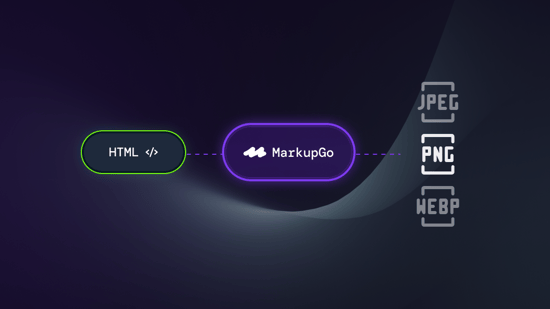
How powerful is the HTML to Image feature?
We’re excited to showcase our HTML-to-Image feature and show how it can be used to convert HTML content into images, making your projects more dynamic and visually engaging.